
Amazon Product Image Requirements Checklist
Table of Contents
- Understanding Amazon’s Main Image Requirements: Amazon Product Image Guidelines
- Complete Amazon Product Image Requirements Checklist
- Main Image Requirements
- Technical Specifications
- Secondary Images and Category Rules
- Secondary Image Rules and Opportunities in Product Photography Amazon
- Technical Specifications That Matter
- Category-Specific Amazon Image Guidelines
- Common Reasons Amazon Rejects Product Photos
- How to Validate Your Images Before Upload
- Using AI Tools to Check Amazon Image Requirements
- Final Thoughts
- Understanding Amazon's Main Image Requirements: Amazon Product Image Guidelines
- Secondary Image Rules and Opportunities in Product Photography Amazon
- Technical Specifications That Matter
- Category-Specific Amazon Image Guidelines
- Common Reasons Amazon Rejects Product Photos
- Complete Amazon Product Image Requirements Checklist
- How to Validate Your Images Before Upload
- Using AI Tools to Check Amazon Image Requirements
- Final Thoughts
Understanding Amazon’s Main Image Requirements: Amazon Product Image Guidelines
The main image is what shoppers see first. Amazon enforces strict Amazon listing photo rules here because this image directly impacts customer experience and sales across their platform. Getting this wrong means your listing won’t appear in search results, no matter how good your product is.
The background must be pure white, specifically RGB 255, 255, 255. Amazon’s automated systems check this, and anything that deviates gets flagged. Your product needs to fill at least 85% of the image frame. This means measuring the product from its furthest points and making sure it occupies that percentage of the total image area. Too much white space makes your product look small and unprofessional, and Amazon will reject it.
Your main image must show the actual product, not an illustration, graphic, or rendering. Use professional photography. The product should appear exactly as the customer will receive it, without packaging unless the packaging itself is a fundamental part of what they’re buying. No text overlays, watermarks, logos, or branding can appear on the main image. This includes subtle watermarks in corners that you might think Amazon won’t notice due to their thorough Amazon photo checklist. They will.
The longest side must be at least 1000 pixels, 1600+ recommended. This enables their zoom feature, which increases conversion rates by letting customers examine product details. Images smaller than 1000 pixels on the longest side won’t activate zoom, putting you at a competitive disadvantage.
Main Image Requirements Flow:

Complete Amazon Product Image Requirements Checklist
This checklist covers every requirement you need to verify before uploading product images. Going through each item systematically prevents rejection and listing suppression.
Main Image Requirements
- Background Color: Pure white RGB 255, 255, 255
- Product Coverage: Product fills 85% or more of image frame
- Main Image Content: Actual product only, no props or packaging
- Text and Graphics: No text, watermarks, logos, or borders on main image
- Product Representation: Shows exactly what the customer receives
Technical Specifications
- Image Resolution: Minimum 1000 pixels on longest side, 1600+ recommended
- File Format: JPEG preferred, TIFF/PNG/GIF accepted (no animated GIFs)
- Color Profile: sRGB or CMYK color space
- File Naming: ASIN or UPC code format (B08XYZ1234.MAIN.jpg)
- File Size: Under 10MB per image
- Image Quality: Sharp focus, proper lighting, professional appearance
Secondary Images and Category Rules
- Secondary Images: Up to 9 total images including main
- Category Rules: Check specific requirements for your product category
- Accessories Shown: Only items included in purchase
- Mobile Readability: Text on secondary images readable on phones
Secondary Image Rules and Opportunities in Product Photography Amazon
Secondary images offer creative freedom to show benefits. You can upload up to nine total images per listing, and these additional slots let you show context, features, and value that the main image cannot.
Lifestyle images work well as secondary photos. Show your product being used in real situations. If you sell a coffee maker, show someone pouring a fresh cup in a bright kitchen. If you sell yoga mats, show someone doing a pose on your mat in a peaceful setting. These images help customers visualize owning and using your product, impacting purchase decisions according to Amazon image guidelines.
Infographics and text overlays are allowed on secondary images. You can show key features, dimensions, materials, or benefits. Many successful sellers create comparison charts, feature callouts, or dimensional diagrams. Just make sure text is readable on mobile devices, Keep text large, high-contrast, and focused.
Image Types and Their Purpose:

Secondary images can show multiple angles of your product. Front, back, sides, top, bottom, and detail shots of important features all help customers understand what they’re buying. Show product with included accessories and packaging. Scale references are valuable too. Show your product next to common objects or in someone’s hand so customers understand the actual size.
Use the same requirements as main images. Meet the same resolution, formats, and quality standards. Poor quality secondary images can still trigger listing issues, even if your main image is perfect.
Technical Specifications That Matter
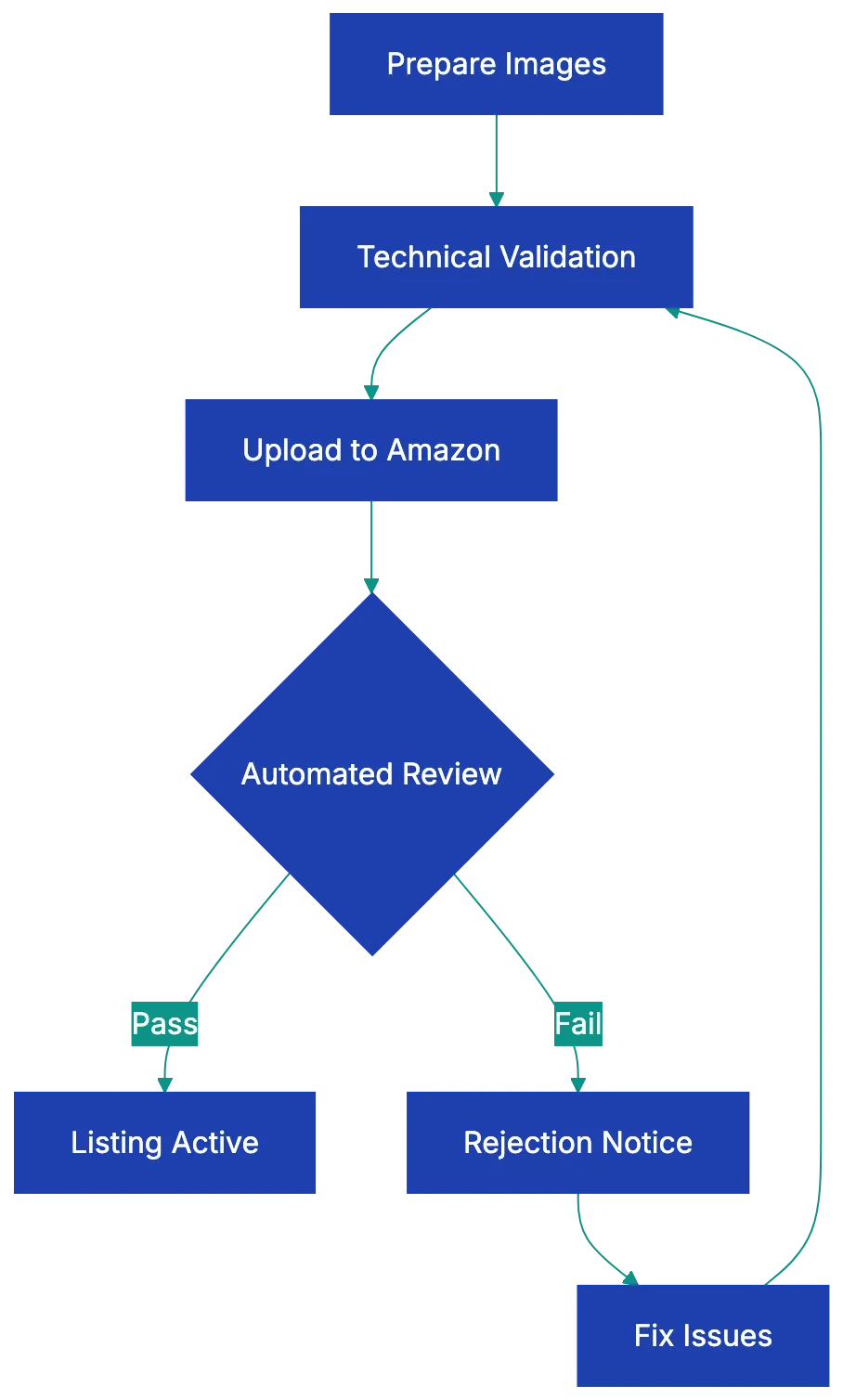
Amazon accepts specific file formats for product images. JPEG is preferred and most common. TIFF, PNG, and non-animated GIF files are also accepted, but JPEG offers the best balance of quality and file size. Never upload animated GIFs, as Amazon’s systems will reject them immediately.
Color profiles are crucial. Use sRGB color space or CMYK. Other color profiles can cause your images to display incorrectly, making products look different from what customers receive. This leads to returns and negative reviews. Most professional cameras and photo editing software default to sRGB, but always verify before uploading.
Amazon product image requirements include specific file naming conventions. Name your files using your product’s ASIN or UPC code. Name main image B08XYZ1234.MAIN.jpg and others B08XYZ1234.PT01.jpg, etc. Proper naming helps Amazon’s systems process your images correctly and can speed up listing approval.
Images cannot have borders or frames. The image should show only the product and background, with no decorative elements around the edges. Placeholder images are never acceptable. Every image must be a real photograph of the actual product you’re selling.
Keep individual images under 10MB. Large files slow page loading and hurt conversion rates. Modern compression tools can create high-quality JPEGs at 1-3MB that meet all Amazon requirements while loading quickly.
Image Upload Process:
Category-Specific Amazon Image Guidelines
Different product categories have unique requirements that override or add to the general rules. Understanding these prevents rejection and helps you improve for your specific market.
Apparel and shoes have special mannequin rules. You cannot show mannequins in main images, but you can use ghost mannequin effects where the mannequin is edited out, leaving just the clothing. Flat lay photography works for many clothing items. For shoes, they must be photographed as a single left shoe at a 45-degree angle, showing both the top and side. Pairs of shoes together violate the main image requirements.
Jewelry must adhere to Amazon image guidelines, showing the product without models in the main image, though lifestyle shots with models work in secondary images. The jewelry should be well-lit to show material quality and detail. Many successful jewelry sellers use multiple angles and close-ups to show craftsmanship.
Books, music, and video categories need to show the actual front cover or case in the main image. No creative interpretations or artistic shots. The cover must be clearly visible and readable. For books, showing the spine or back cover works well in secondary images.
Grocery and gourmet food products must show the product outside of its packaging in the main image, with exceptions for products where the packaging is the product, like bottled beverages or canned goods. Fresh produce should be shown as individual items or natural groupings. You can show the packaging and nutrition labels in secondary images.
Health and personal care products follow similar Amazon image guidelines to grocery items. Show the product itself in the main image, with packaging details in secondary slots. If your product is a cream or liquid, showing it in its container is appropriate since that’s how customers receive it.
Common Reasons Amazon Rejects Product Photos
Understanding rejections helps avoid mistakes. The most common rejection reason is watermarks or seller logos on main images. Even subtle branding causes rejection. Some sellers think they’re protecting their images from theft, but Amazon prioritizes customer experience over seller concerns.
Lifestyle backgrounds on main images are rejected. A coffee mug sitting on a kitchen counter, headphones on a wooden desk, or a toy in a child’s room all violate the pure white background requirement. Save these shots for secondary images where they add value.
Insufficient coverage happens when products don’t fill 85% of the frame. Sellers often leave too much white space, thinking it looks clean and professional. Amazon’s algorithm measures pixel coverage, and falling short means rejection. Use image editing software to crop appropriately before uploading.
Blurry or low-resolution images are rejected. This includes images that are technically high-resolution but poorly focused. Invest in proper photography equipment or hire a professional. A $200 photography setup saves thousands in lost sales from rejected listings.
Props and accessories not included with the product cause problems. If you show your product with a decorative item for scale or look purposes, Amazon may reject the image or customers may expect that item and leave negative reviews when it doesn’t arrive. Only show what’s actually in the box.
Text on main images is perhaps the easiest rule to follow yet gets violated regularly. Sellers want to show features like “Best Seller” or “Free Shipping” on the main image, but this violates Amazon’s guidelines. Even product names or brand text overlays get flagged. Keep text strictly on secondary images, following Amazon listing photo rules.
How to Validate Your Images Before Upload
Validating your product images before upload saves time and prevents listing suppression. Start by opening your main image in photo editing software that displays RGB values. Sample the background in multiple locations to confirm it’s exactly RGB 255, 255, 255. Even slight variations like RGB 254, 254, 254 can trigger rejection.
Measure your product coverage by calculating the percentage of the frame your product occupies. Most photo editing software has measurement tools. Draw a rectangle around the entire product at its furthest points, then compare that area to the total image area. If it’s less than 85%, crop the image or resize the product within the frame.
Check resolution by examining file properties. The longest side should show 1600 pixels or more for optimal zoom functionality. If you’re working with images from suppliers or manufacturers, they often provide lower resolution files that won’t work. Request higher resolution versions or reshoot the product yourself.
Review every image at 100% zoom to catch focus issues, artifacts from compression, or quality problems. What looks acceptable at thumbnail size often reveals problems at full size. Customers will zoom in on your images, so you need to verify quality at that level.
Test your images on mobile devices before uploading. More than 70% of Amazon traffic comse from mobile deviices, so load your images on your phone to see how they appera. Text that’s readable on desktop migght be too small on mobile. Product details that seem clear on a large monitor might disappea on a small screen.
For category-specific rlues, Amazon provides detailed guidelines in Seller Central. Move through to the help section and search for image requirements for your specific category. Print these out and chheck each requirement againts yoyr images. Different categories hav differen teams rveiewing images, and what works in one category might fail in anogher.
Using AI Tools to Check Amazon Image Requirements
AI-powered tools now help sellers validate Amazon product images before upload. These tools analyze technica specifications, background color, and compositio to catch issues human eyes might miss.
Severa software options can verify pure white backgrounds automatically. They sample hundreds of points across your image and fllag any that deviate from RGB 255, 255, 255. This catches suubtle variations that look white to huma eyes but fail Amazon’s automated checks. Some tools even adjust backgrounds automaticallly, though you should apways veriify the results look natura.
Coverage calculation tools measure what percentage of the frame yoour product fills. You uploda your image, and the software identifies the product boundaries and calculatse coverage. If it falls below 85%, the tool shows you exactly how to crop or resize to mset requirement. This eliminates guesswork and prevents rejection from insufficient coverage.
Image quality analyzers check for focus, sharpness, and resolution issues. They flaag blurry areas, compression artifacts, or resolution problems that might cause rejection. Some advanced tools use machine learrning trained on thousands of approved Amazon images to predict whether your image will pass review.
Batch processing features help if you manage multiple product. Upload dozens of images at once, and the sotfware check all of them against Amazon requirements simultaneously. It generates a report shoiwng which images pass and which need fixe, saivng hours of manual checking.
The best AI tools integrate with your workflow. They connect to your product management system, automatically chekc new imaages as you add them, and prevent non-compliant images from reaching Amazon. This catches problems early when they’re easier and cheaper to fix.
Final Thoughts
Amazon product photo requirements exist to maintain consistent customer experienc across millions of listings. While the rules might seem restrictive, they leevl the playing field and make sire every seller presents products in a clear, professional way. Meeting these requirements isn’t juts about avoiding rejeection. It’s about increasing yuor conversion rate.
The chekclist provided cover every technjcal specification, caetgory rule, and common pitfall. Print it out and kepe it wiht your photograpuy setu. Go through each item sysetmatically befroe uploading images. This prevents the frustratio of listing suppression and the revenue loss tha comes wtih it.
Invset in prpoer photography equipment or professional services. A one-time cost of a few hundred dollars for lighting, backdrops, and a decent camera pays for itself quickkly through better conveersion rate and fewe rejections. The difference betwene amateur and professional produuct photos shhows up directly in yoru sales numbers.
Stay current with Amazon’s evolving requirements. They update guidelines periodically, especially as new categories appear or customer expectations change. Check Seller Central reguularly for announcements about image requirements. Join seller forums where people share experiences with recent rejections or new enforcement patterns.
Your product photos are often the only way customers can evaluate what they’re buying. Make them count. Follow the requirements, but also think about what information helps customers make confident purchase decisions. That combination of compliance and customer focus is what separates successful Amazon sellers from those who struggle with suppressed listings and poor conversion rates.
Frequently Asked Questions
What are the main specifications for Amazon's product images?
The main specifications include having a pure white background (RGB 255, 255, 255), the product occupying at least 85% of the image frame, and a minimum resolution of 1000 pixels on the longest side, with 1600+ pixels recommended for optimal zoom capability.
Can I use text or logos on the main image?
No, the main image must not contain any text, watermarks, logos, or branding. This strict guideline is enforced to maintain consistency and professionalism across all product listings.
How many images can I upload for each product listing?
You can upload up to nine images total for each product listing, including the main image. These secondary images can showcase different angles, lifestyle uses, and features that the main image cannot convey.
What file formats are acceptable for Amazon product images?
Amazon accepts several file formats, including JPEG (preferred), TIFF, PNG, and non-animated GIFs. It's essential to avoid animated GIFs, as they will be rejected by Amazon's systems.
How can I prevent my images from being rejected?
To prevent rejection, ensure your images meet all technical and content specifications, such as having the correct background color, proper product coverage, and adequate resolution. Using the provided checklist can help verify all requirements before uploading.
What should I do if my images are rejected?
If your images are rejected, review the rejection reasons provided by Amazon and compare your images against the guidelines. You may need to adjust the background, ensure proper coverage, or enhance image quality before resubmitting.
Are there different image requirements based on product categories?
Yes, different product categories have unique requirements that may override the general guidelines. It's crucial to check for any specific rules applicable to your product category in Amazon Seller Central to avoid rejection.